

Mastering Product Launch Videos with Claude Opus 5.5: Techniques and Best Practices
Learn how Claude Opus 5.5 revolutionizes product launch videos by automating animation with precise frame control, streamlining the workflow, and enabling multi-format exports with React-based Remotion integration.
On this page
Introduction to Claude Opus 5.5 for Product Launch Videos
Creating engaging product launch videos is a crucial marketing strategy in today’s digital landscape, yet traditional video production can be costly and time-consuming. Claude Opus 5.5 introduces a novel approach by combining AI-driven code generation with the React-based Remotion framework to automate the creation of polished launch videos.
Why Claude Opus 5.5 Stands Out in Video Automation
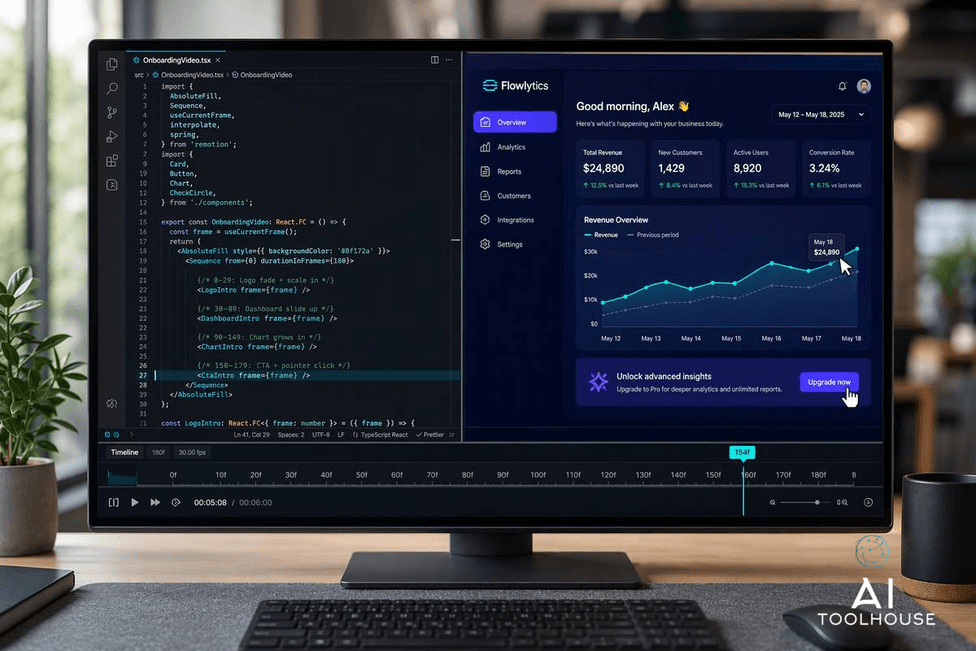
Most studios charge thousands for short animated videos, but Claude Opus 5.5 can generate coded animations that Remotion renders seamlessly, reducing time and cost significantly. Unlike generic "make it smooth" prompts, this system emphasizes precision by anchoring animation to explicit frame numbers, allowing clear control and reproducibility.
Setting Up a Project in Claude Opus 5.5
Getting started involves:
- Launching the Claude app with the Opus 5.5 model
- Enabling code execution and file creation
- Preparing screenshots of your product interface for reference
- Defining consistent visual style parameters, such as background and accent colors
- Setting clear project rules emphasizing frame-based animation and modular timeline control
This structure ensures clarity and consistency throughout development and collaboration.
Streamlined Workflow for Creating Product Launch Videos
Step 1: Extracting the Key Visual Action
Product launch videos must focus on a visually compelling action paired with an immediate result rather than showcasing every feature superficially. Claude Opus 5.5 excels at distilling long changelogs into single, filmable events, optimizing content for viewer engagement.
Step 2: Designing Motion with Precision
Claude constructs a "Motion Lab" component with multiple easing animations (linear, cubic ease-out, various spring dampings) for side-by-side comparison.
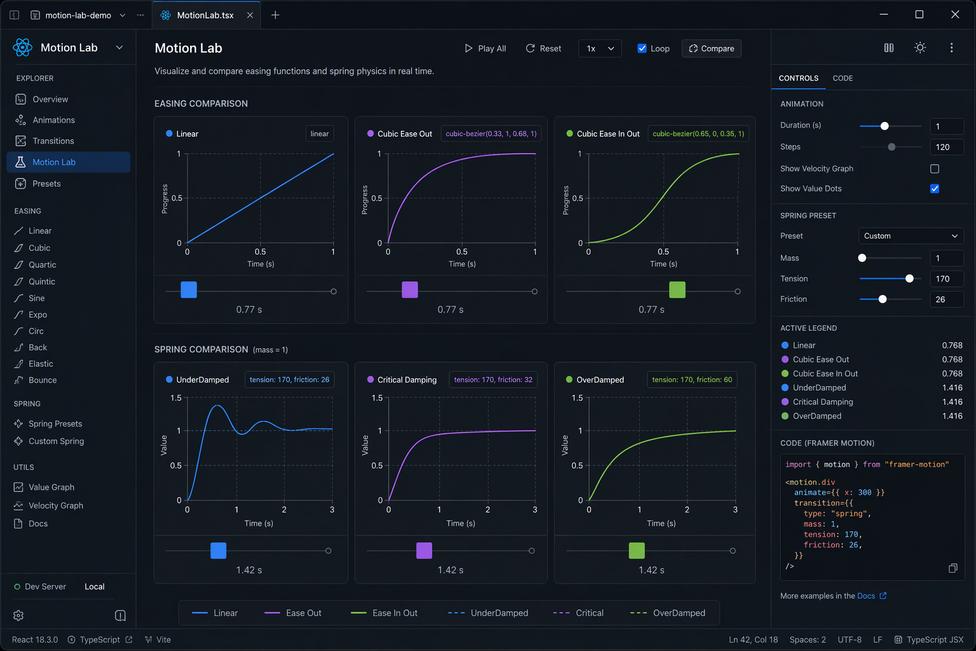
This enables marketers and designers to select the motion style that best aligns with brand identity.
Step 3: Building Reusable Interactive Elements
Key interactive sequences, like a cursor moving and clicking a button with visual feedback, are abstracted into reusable ClickToWow components.
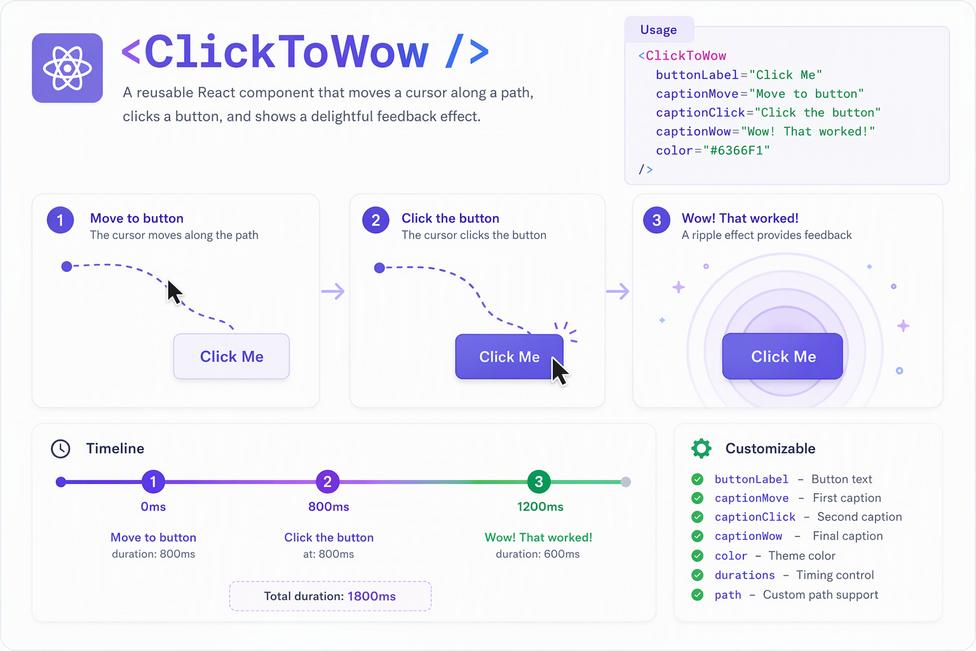
Properties such as the cursor’s trajectory, click timing, and label captions are customizable, streamlining video assembly for future launches.
Step 4: Multi-Format Timeline Management
Recognizing the platform diversity—social feeds, reels, shorts, and YouTube—Claude structures timelines consistently while applying varied layout dimensions (square, vertical, landscape). This eliminates redundant animation efforts and ensures synchronized timing across all formats.
Key Technical Innovations
- Frame-Number-Based Animation: Each visual element’s state is functionally tied to its frame index, eliminating ambiguities in timing and overshoot effects.
- Code-First Video Creation: Claude writes React components and timing scripts automatically, while Remotion compiles these into high-quality MP4s.
- Readability Safety Checks: Automated validation ensures text elements remain visible long enough for viewers to read comfortably, improving UX.
Best Practices to Avoid Common Pitfalls
- Avoid CSS transitions that may flicker since Remotion redraws frames independently.
- Use Remotion’s seeded random functions to maintain visual consistency across renders instead of JavaScript native randomness.
- When identifying issues, provide precise remediation instructions to Claude naming frame numbers and requested fixes without altering unrelated elements.
Exporting and Reviewing Final Videos
Once approved, follow these steps:
- Compress the project folder with a README summary
- Use Node.js commands to install dependencies and render videos in multiple aspect ratios
- Review videos in real-time to ensure animation fluidity and text legibility
Practical Implications for Marketing Teams
Integrating Claude Opus 5.5 and Remotion makes video content creation accessible to teams without large animation budgets or extensive After Effects expertise. The modular, reusable code components speed up future launches, allowing marketing professionals to focus on storytelling and messaging instead of technical production.
Conclusion
Claude Opus 5.5 transforms product launch video production by leveraging precise frame-based animation scripting and React integration via Remotion. Its methodical process—from identifying the most filmable feature to rendering multi-format videos—simplifies workflows for marketers and developers alike. By abstracting complex animation into reusable components and consistent timelines, it ensures efficient, high-quality, and visually coherent product introductions that engage audiences effectively. Embracing this technology can save time, reduce costs, and elevate the impact of your product launches.