


Visit Website
(0 user reviews)
Swaps faces in photos and videos, auto-erases uploads.
Introducing Facy AI Face Swap: Effortless AI-Powered Face Swapping Online
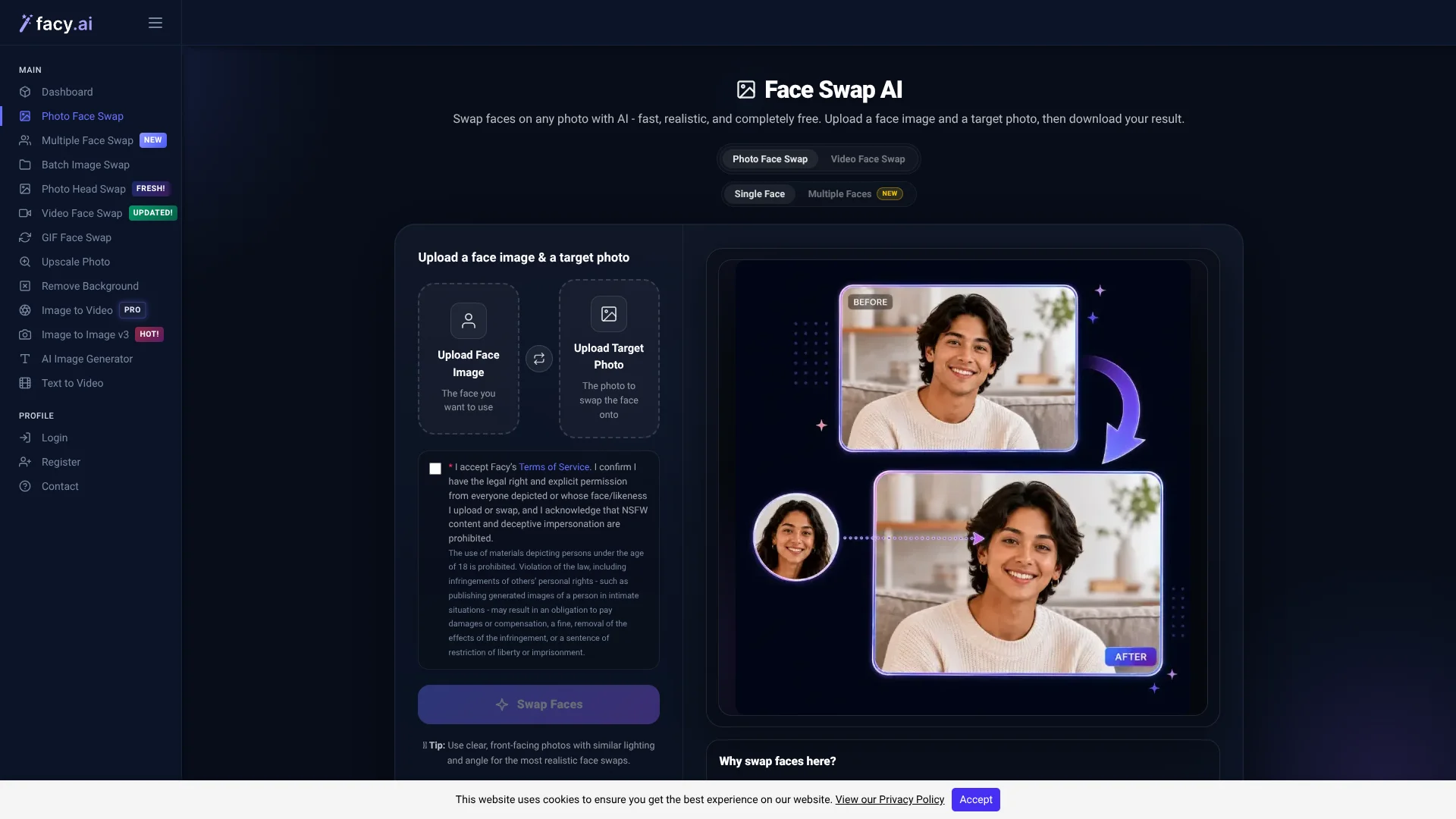
Facy AI Face Swap is an intuitive, web-based application designed to seamlessly interchange faces in photographs using cutting-edge artificial intelligence. Accessible through the Facy AI platform, this tool allows users to instantly swap faces on single images for free without the hassle of creating an account. Logged-in users enjoy advanced options such as swapping multiple faces in group photos and complete head replacements. Its AI algorithm excels at blending skin tone, lighting, and facial expressions naturally, making it an ideal solution for content creators, small teams, and casual users wanting fast and shareable edits for social platforms.
Core Capabilities:
- Complimentary Single Face Swaps: Execute face swaps directly in your browser with no sign-up needed, supporting popular formats including JPG, PNG, WEBP, BMP, and GIF up to 20 MB in size.
- Group Photo Multi-Face Replacement: Accurately detects up to 20 faces in a single image, enabling users to assign distinct replacement faces to each individual in one streamlined action, available with a basic account.
- Head Swap and Bulk Processing Features: A specialized mode enables swapping entire heads rather than just faces, plus batch processing for handling multiple images simultaneously, speeding up creative workflows.
- Face Swapping in Videos and Animated GIFs: The AI tracks facial movements across formats like MP4, MOV, AVI, MKV, WEBM, and GIF animations, utilizing credits from your account for each processed motion file.
- Robust Privacy and Ethical Measures: Files are purged automatically from servers within approximately two days; users receive explicit consent requests, with safeguards preventing underage and inappropriate content as well as automatic celebrity face recognition.
Advantages
Truly free image swapping: Perform core face swaps on photos without any charges or the need to register, perfect for fast one-off edits.
User-friendly interface: A straightforward three-step process — upload, wait, and download — makes it accessible to users without any technical background, online or on Android devices.
All-in-one swapping hub: Whether you need single face swaps, multiple faces, bulk images, full head replacements, or motion content swaps, everything is integrated within the same AI workspace — no need for separate apps.
Comprehensive safety protocols: Clear consent requests, age verification, and impersonation warnings are prominently displayed, promoting responsible and ethical use.
Prompt file removal: Uploaded and generated images are automatically erased about two days after processing, ensuring enhanced user privacy.
Drawbacks
Credit-based access for videos and GIFs: Motion face swaps require purchasing credits or subscribing; free usage primarily covers static images.
Minimal manual customization: The absence of detailed controls like masking brushes or region-specific color adjustments limits advanced editing flexibility.
Strict restrictions on content: Automated filters blocking celebrity images and underage faces can restrict user creativity on parodies or fan-made projects.
Who Benefits from Using Facy AI Face Swap?
- Content creators on social networks: Instantly transform everyday snapshots into fun memes, reaction images, and character collages for platforms like TikTok, Instagram, and X.
- Advertising and creative teams: Rapidly prototype marketing visuals or client concepts by experimenting with different face placements within design layouts.
- Independent filmmakers and editors: Preview casting choices and video edits with AI-generated face swaps before investing in full production.
- Cosplayers and wardrobe stylists: Visualize how faces fit on reference characters to plan makeup and costume designs effectively.
- Gaming and sports media makers: Create player artwork, thumbnails, and fan content by merging real faces with gaming or promotional images.
- Specialized applications: Educators demonstrating AI media ethics, or UX researchers testing user engagement with varied facial visuals in products.
Pricing Structure:
- Free Plan: Enjoy unlimited image swaps at standard quality with longer processing times, designed for casual browser use like single-image face swaps.
- Basic Package: One-time fee of $19.99, including 20 video face swaps (up to 2 minutes), unlimited image swaps, 100 image-to-image transformations, and 200 text-to-image creations.
- Plus Subscription: $89 per month giving 25 video swaps (up to 20 minutes), unlimited photos, 125 image-to-image edits, and priority processing speed.
- Professional Plan: $399 monthly, adding 30 video swaps (up to 60 minutes) plus 150 image-to-image edits alongside all Plus benefits.
Note: Pricing details may change; for the latest and precise information, please visit the official Facy AI Face Swap website.
What Distinguishes Facy AI Face Swap From Others?
Facy AI Face Swap stands out by combining a genuinely free and open-access single photo face swap with an advanced suite that includes multi-face, full head, GIF, and extended video swapping capabilities. Its strong commitment to privacy—featuring automatic file removal and stringent age and consent regulations—alongside blocking celebrity impersonations creates a unique balance of casual accessibility and professional-level functionality. This thoughtful approach separates it from many competitors that either hide essential features behind paywalls or overlook vital safety measures.
Swift, Free Face Swapping Perfect for Creators
This tool offers individuals and small creative teams an uncomplicated method to achieve realistic AI-driven face swaps without the complexity of local installations or paying per image. The free browser version covers most everyday photo editing needs, while subscription plans unlock high-resolution output, batch processing, and extended video editing. It excels where convenience and speed trump intricate manual adjustments, making it an excellent choice for social content creation, concept development, and lightweight production projects.
People Also Viewed


Get Featured! 🚀
Feature your AI brand at the top of our homepage for 7 days! Exclusive sponsorship for AI tools, platforms, and applications.
Get Featured NowPromote Facy AI Face Swap